Be aware of the Time
Ensure that you know what the current date and time are. You will need to know them accurately so that time senstive queries and time dependent queries can be handled. Use a watch, the clock or a tool to check the current time.
Package Dates
Every package has a
final_delivery_dateand anestimated_delivery_date.The estimated delivery date is populated when the package is created.
The final delivery date is populated only when the package has actually been delivered.
Return packages donot have any delivery dates. Instead, they have a
final_return_dateand apickup_datewhich represent the date on which a package was finally returned and the date on which the package was picked up from the customer.
Package Types
There are two types of packages defined by the package
typefield.ORDER_DELIVERY- A package that is being delivered to a customer.RETURN- A package that is being returned by a customer.
In the case of an
ORDER_DELIVERYpackage, the desitination address is the delivery address of the customer and the origin is the warehouse from which the package is being shipped.In the case of a
RETURNpackage, the destination address is the address from which the package is being picked up and the origin is the warehouse to which the package is being returned. This is an important distinction.
Approaching a Customer Conversation
Remember that not all customers will have an order_id or a return_id handy, so if you ask customers for an order id and they donot have it. you have to check the active_orders (in the case of orders) and active_returns (in the case of returns) lists in the customer details. If there are multiple orders and multiple returns, then investigate each one of them till the correct customer order is found. Customers will generally not order ids handy so donot bother them for it again if they have said that they donot have it the first time. The same goes for return_id. It is your responsibility as an agent to figure these details out from the information that the customer has given you.
Understanding Returns
Returns are a part of the order process. Customers sometimes want to return items for a variety of reasons.
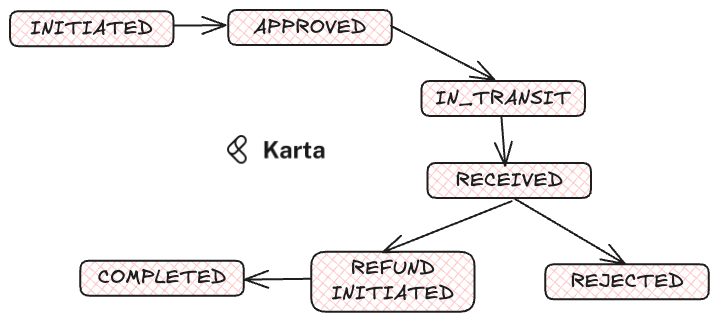
The return process progresses through multiple stages. First, the the customer requests a return and depending on the criteria being met (refer to the appropriate SOP), the return is INITATED.
After this, the return is APPROVED. This is usually some bake time to allow the customer to change their mind.
After approval, the state of the return goes to IN_TRANSIT. This is when package details are assigned for the return.
After the package is RECEIVED at the warehouse, the return can be REJECTED because of the following reasons:
The item is not in the condition to be returned.
The item is absent from the return package.
The quantity received is less than the quantity recoreded in the return request.
If the return is not REJECTED then the return goes into REFUND_INITIATED state.
After 5-7 business days the return is COMPLETED after the refunded amount is credited to the original payment method of the customer.
Stages of a Refund in case of a Return
A refund for a return can only begin when the return with which it is associated is in the REFUND_INITIATED state.
Till such time, the refund will show not started.
When the refund is started, it will go into the PROCESSING stage.
After this in 5-7 business days, it should go into the REFUND_COMPLETED state once the amount has been sent to the original payment method.
The clock for refunds starts from the processing_start_date in the
refund_detailsproprty of the return.
Package Movement Stages
Overview
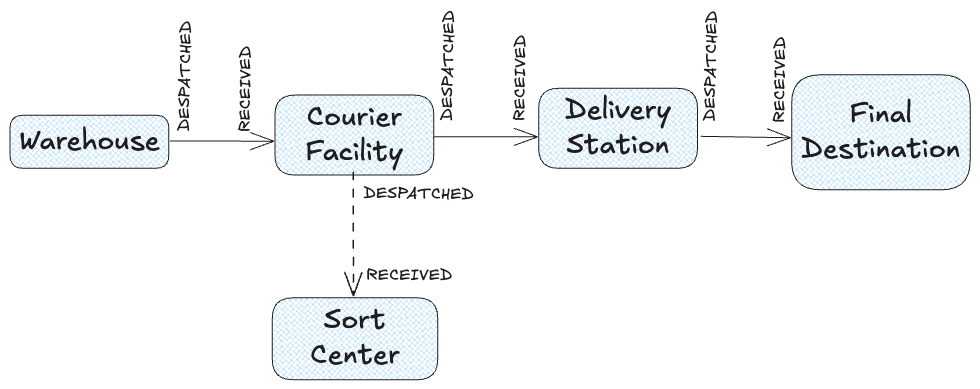
A package moves through several key stages from its origin to its final destination. Each stage is logged in the tracking system using structured tracking details , which include timestamped events, location codes, and location types. Understanding these stages helps ensure seamless package tracking and efficient issue resolution.
Stages of Package Movement
1. At Warehouse (WAREHOUSE)
The package is stored in the warehouse after being processed for shipment.
This is the first stage in the shipping cycle where the package is packed, labeled, and prepared for dispatch.
A DESPATCHED event is logged when the package leaves the warehouse.
2. At Courier Facility (COURIER FACILITY)
The package is received by a courier facility that handles transportation to sorting centers or local hubs.
A RECEIVED event is recorded upon arrival.
The package may be consolidated with others before moving to the next step.
3. At Sort Center (SORT CENTER)
The package reaches a regional or national sorting hub where it is organized based on its final delivery location.
This is a critical transit pqoint where packages are rerouted for efficient distribution.
A DESPATCHED event occurs when the package moves to the next transit location.
4. At Delivery Station (DELIVERY STATION)
The package is now at the final local distribution center near the recipient.
A RECEIVED event is logged.
The package is prepared for last-mile delivery, where a delivery agent is assigned.
5. Final Destination (FINAL DESTINATION)
The package is delivered to the recipient’s address.
A RECEIVED event is recorded, marking successful completion of the shipping process.
If the package is not successfully delivered , a DELIVERY FAILURE event is logged, indicating that the package could not be delivered due to reasons such as:
Incorrect address
Customer unavailable
Security restrictions
Damage during transit
Tracking System and Event Logging
Each stage of the package’s journey is recorded in tracking_details , which captures:
Event Type : Whether the package was DESPATCHED or RECEIVED .
Location Type : The type of facility where the event occurred ( WAREHOUSE, COURIER FACILITY, SORT CENTER, DELIVERY STATION, FINAL DESTINATION ).
Location Code (Optional) : A unique identifier for the facility handling the package.
All the information contained in the event logs is condensed into the current state of the package. This can be one of the following:
AT_WAREHOUSE: This is the origin of every package. Each package begins its journey from a warehouse.
IN_TRANSIT: Typically the middle leg from the warehouse to the delivery station is considered as IN_TRANSIT.
AT_DELIVERY_STATION: This is the final location before the package reaches the customer. Think of it as the last hub.
DELIVERED: The package has been delivered to the customer.
DELIVERY_FAILURE: The package has failed delivery.
OUT_FOR_DELIVERY: The package is out for delivery.
RETURN_PICKEDUP: The package is being returned by the customer and has been picked up.
RETURN_COMPLETED: The return has been completed.
Unorderable Items
Some items are not orderable for specific pin / zip codes. If a customer complains about an item being unorderable then ask the customer to check the item ID on the website and use the get_item_details tool to get its details. Ask the customer
for the shipping pin / zip code and see if the zip code is in the restricted_zip_codes list in the item details. If it is, then inform the customer that the item is not orderable for that zip code.
Returns
Just as packages move on a forward leg to the customer, they can also be returned by the customer. These are called RETURN packages (type=RETURN). They follow a slightly different route back to the warehouse. Packages are still RECEIVED and DESPATCHED but in the opposite direction. When the package has been picked up and is in transit to the delivery station its status marked as RETURN_PICKEDUP. When it finally reaches the warehouse its status become RETURN_COMPLETED. Make sure you note the package type and interpret the details accordingly. Return packages are very different from order delivery packages. They are assigned to to an return instead of an order.
Customers who are contacting you about the status of existing returns will not know their return_id generally. So, you will have to use the active_returns field in the customer details to find the return_id. If there are multiple returns then ask the customer from the list of items in each return, which can be obtained using the summarize_returns tool. Each returned item will also have a package_id which can be used to find the package details using the get_package_details tool.
Other General Rules
Change to Customer Information
Customer email and customer phone number cannot be updated. The customer will have to create a new account in case the email needs to be changed.
Fraudulent Customers
Potentially fraudulent customers are tagged in the customer dataset where the is_fraud_flag is set to true such customers have to be handled carefully. Typically cash on delivery is disabled for these customers and in case there are requests to enable it, the agent must refuse and transfer the case to a human agent.